SMS terms
Last updated September 25, 2026
These terms cover LoadoutGuard Alerts, the text messages LoadoutGuard sends about equipment and sign-in. LoadoutGuard is operated by General Resistance, LLC (generalresistance.com).
The program
Program name: LoadoutGuard Alerts. Sent by: General Resistance, LLC, from +1 (864) 651-1769.
LoadoutGuard tracks the tools and equipment on work trucks for landscaping and pressure washing companies. We send two kinds of text:
- Equipment alerts to crew leads and managers at companies that use LoadoutGuard: a tool was left behind, where it was last seen, and a follow-up when it's back on the truck; a reminder when it still isn't back; a note to managers when the crew hasn't answered; a morning check when a truck in the yard is missing something on its list; a note when a truck leaves the yard without its usual equipment, or when equipment is riding on another truck; and a heads-up when a truck's unit loses power or stops reporting, or a tag comes off a tool. You get these only after you opt in (below).
- Sign-in codes, one text with a one-time code, sent only when you ask for one on the LoadoutGuard sign-in screen.
We don't send marketing or promotional texts. Message frequency varies: it depends on how often equipment is left behind, typically a few texts a week and more on busy days.
How you opt in
You sign up for equipment alerts yourself. Nobody else can enter your number or agree to texts for you, and we never text a number before its owner signs up.
- An admin at your company invites you in LoadoutGuard. You get a private sign-up link by email, or from your manager as a link or a QR code. The link works once and expires after 7 days.
- On the sign-up page you enter your own name and mobile number, read what you're agreeing to, and check the box yourself. It starts unchecked, and nothing is sent without it.
- We record your sign-up (your number, the time, and the exact wording you agreed to) and text you a confirmation:
Opt-in confirmation · Sent right after you sign up for texts on the sign-up page. LoadoutGuard: You're signed up for equipment alerts from Blue Ridge Softwash. Msg frequency varies. Msg&data rates may apply. Reply HELP for help, STOP to opt out.
- Equipment alerts follow as equipment is left behind. Reply STOP at any time to stop them.
Sign-in codes aren't a subscription: a code is sent only when you enter your number on the sign-in screen and ask for one.
Consent to receive texts is not a condition of purchase. We never buy phone numbers or share them for marketing (see the privacy policy).
How people opt in
There are three places a phone number enters LoadoutGuard Alerts, and at each the person types their own number. The screens need an account or a private link, so here they are exactly as they appear, with example data. The number shown, (555) 010-0142, is fictional. A working copy of the sign-up page, with an example company, is at loadoutguard.com/join/example (it saves and sends nothing).
1a. A company admin invites a crew lead
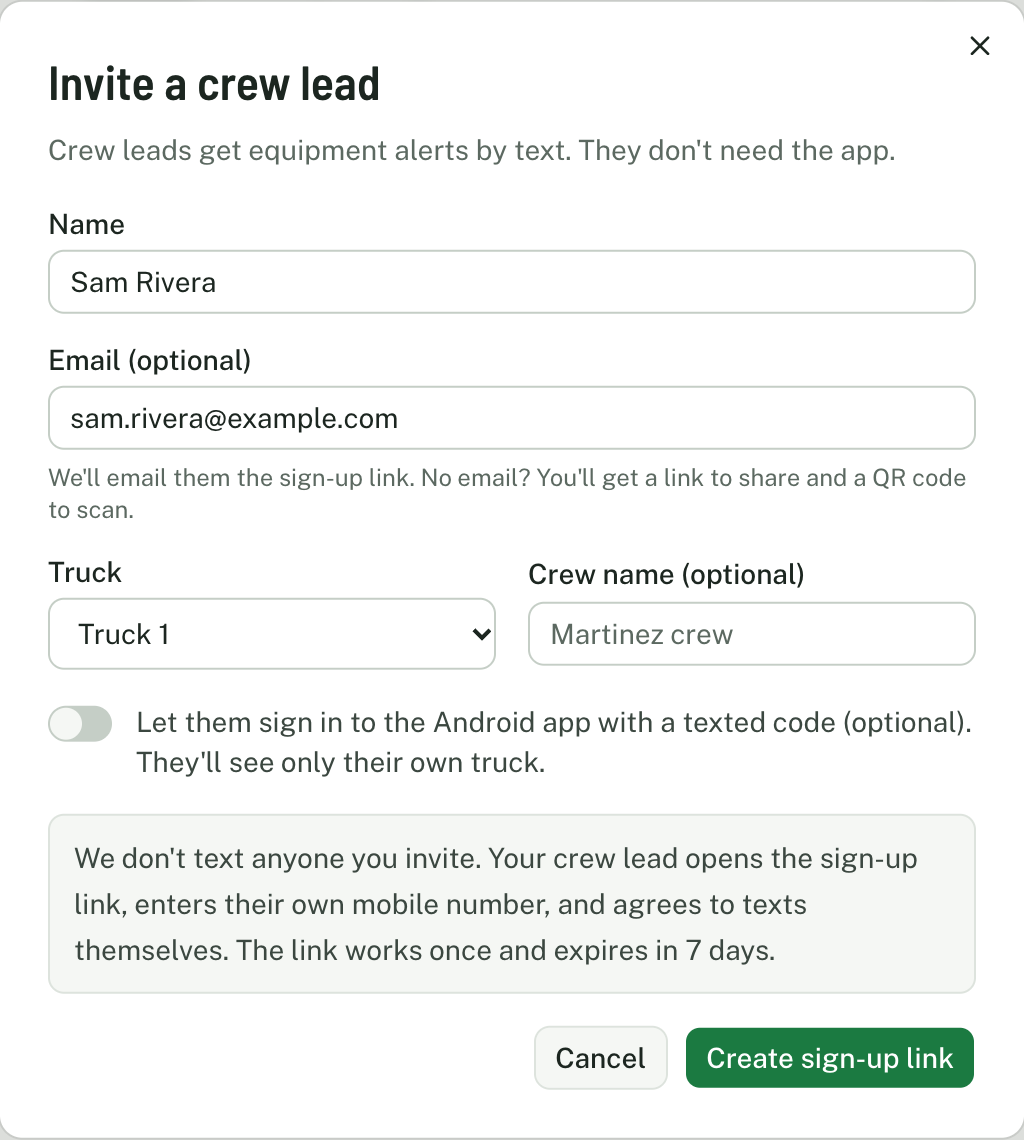
An admin at the crew lead's company signs in, opens Settings, then Crews, and chooses Invite crew lead. They enter the crew lead's name and, optionally, an email address. There is no phone number field, and no consent box: the admin can't sign anyone up. The form says:
We don't text anyone you invite. Your crew lead opens the sign-up link, enters their own mobile number, and agrees to texts themselves. The link works once and expires in 7 days.
LoadoutGuard emails the crew lead a private sign-up link (or the admin shares the link or shows its QR code). No text message is sent at this step.
1b. The crew lead signs up themselves (equipment alerts)
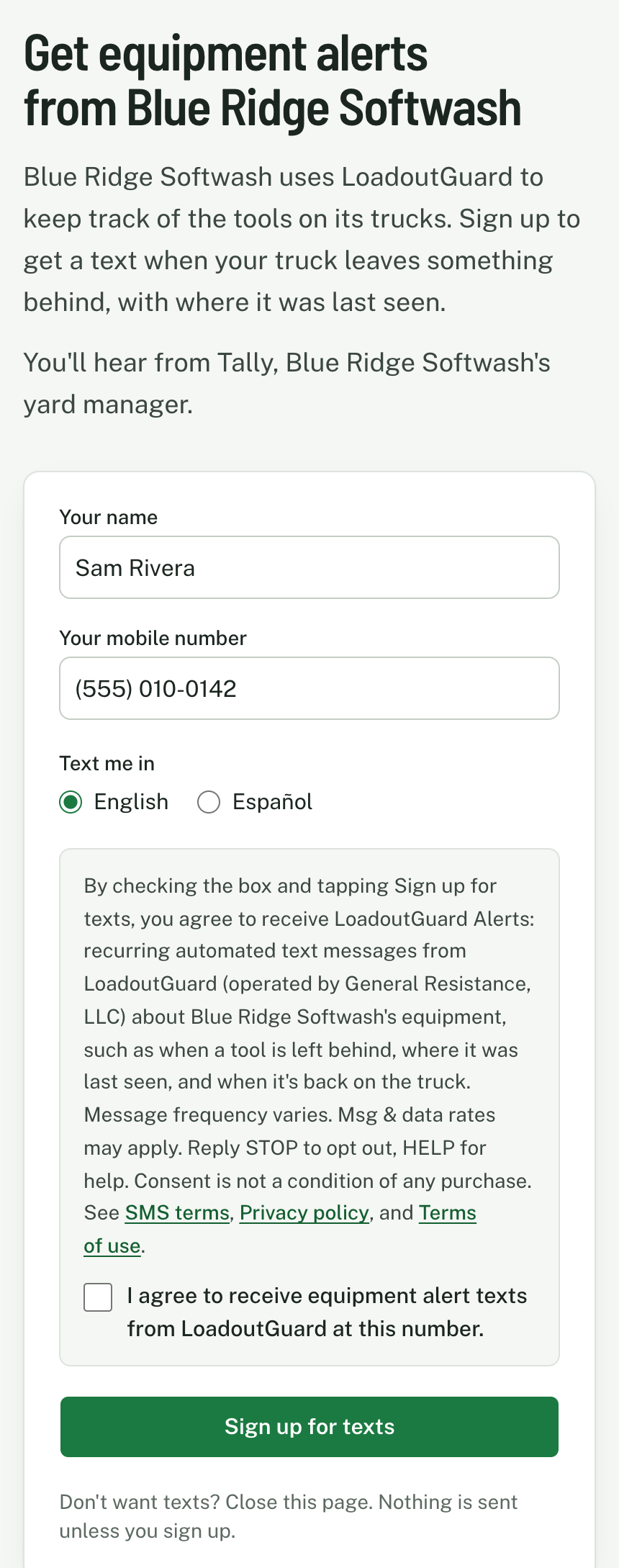
- The crew lead opens the link on their own phone and enters their name and mobile number. Directly above the checkbox the page shows (for Blue Ridge Softwash):
By checking the box and tapping Sign up for texts, you agree to receive LoadoutGuard Alerts: recurring automated text messages from LoadoutGuard (operated by General Resistance, LLC) about Blue Ridge Softwash's equipment, such as when a tool is left behind, where it was last seen, and when it's back on the truck. Message frequency varies. Msg & data rates may apply. Reply STOP to opt out, HELP for help. Consent is not a condition of any purchase. See SMS terms, Privacy policy, and Terms of use.
- They check the box "I agree to receive equipment alert texts from LoadoutGuard at this number." themselves. It starts unchecked, and the form can't be sent without it.
- They tap Sign up for texts. We store the number, the time, their IP address and browser, and the exact wording shown, then text the confirmation:
LoadoutGuard: You're signed up for equipment alerts from Blue Ridge Softwash. Msg frequency varies. Msg&data rates may apply. Reply HELP for help, STOP to opt out.
2. A user asks for a sign-in code
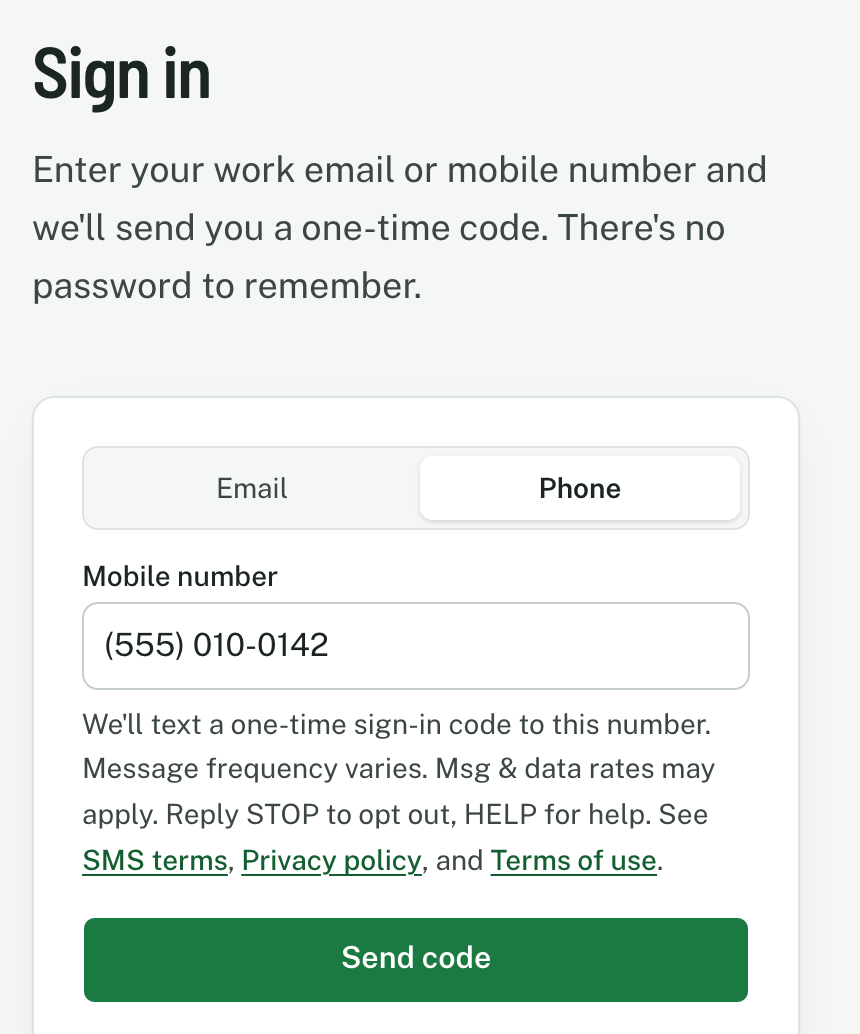
On the LoadoutGuard sign-in screen a user chooses Phone, enters their own mobile number, and taps Send code. Directly under the number the screen shows:
We'll text a one-time sign-in code to this number. Message frequency varies. Msg & data rates may apply. Reply STOP to opt out, HELP for help. See SMS terms, Privacy policy, and Terms of use.
We send one text with a one-time code for each request. It isn't a subscription, and codes go only to numbers already on a LoadoutGuard account, or to a number a signed-in user is adding to their own account (step 3).
3. A company owner or manager signs up for alert texts themselves
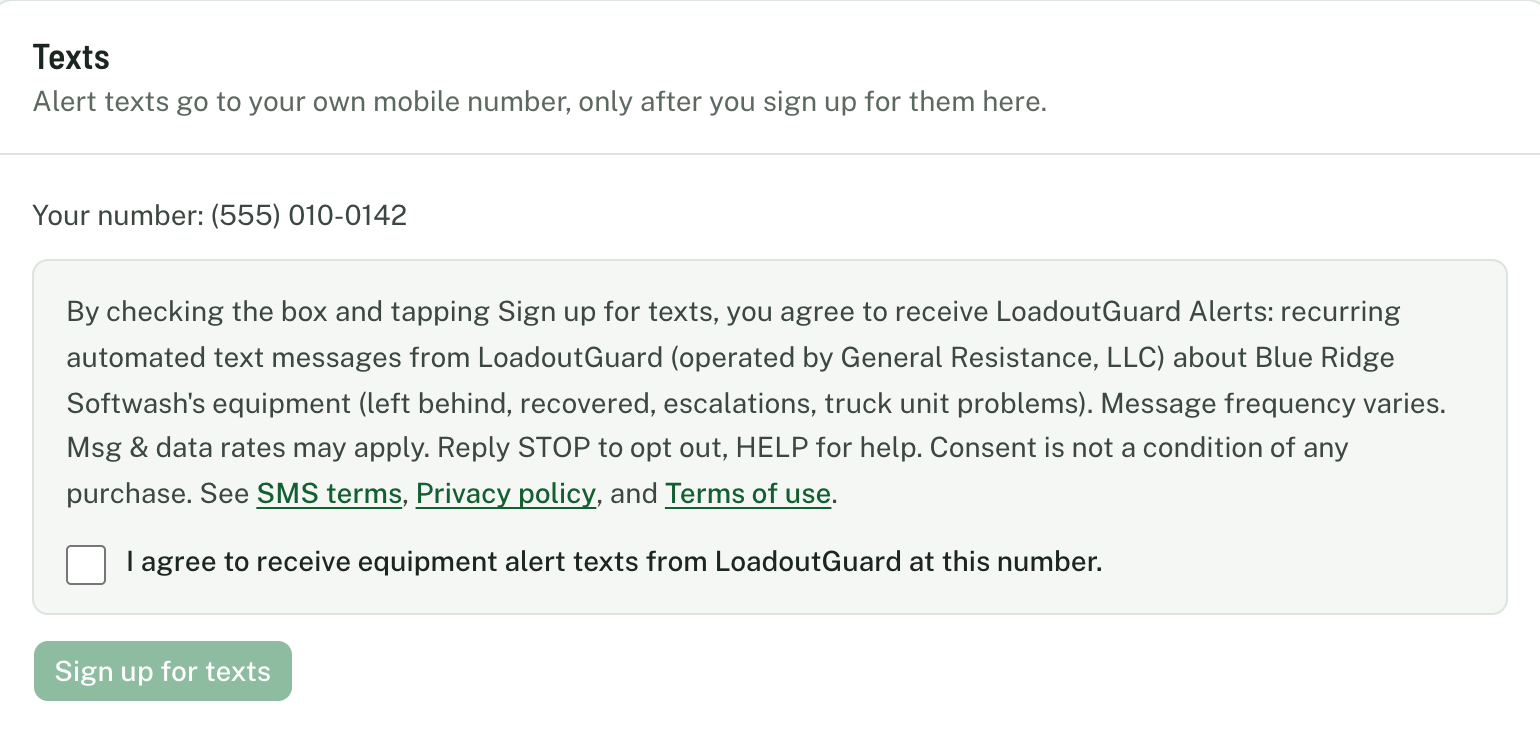
- A signed-in owner, admin, or manager opens Settings, then Notifications. If their account has no mobile number, they add their own and confirm it with a one-time code. Under the number the screen shows:
We'll text a one-time code to confirm this number. Msg & data rates may apply. Reply STOP to opt out, HELP for help. See SMS terms, Privacy policy, and Terms of use.
- Signing in or confirming a number doesn't sign anyone up for alerts. Directly above a separate checkbox the screen shows (for Blue Ridge Softwash):
By checking the box and tapping Sign up for texts, you agree to receive LoadoutGuard Alerts: recurring automated text messages from LoadoutGuard (operated by General Resistance, LLC) about Blue Ridge Softwash's equipment (left behind, recovered, escalations, truck unit problems). Message frequency varies. Msg & data rates may apply. Reply STOP to opt out, HELP for help. Consent is not a condition of any purchase. See SMS terms, Privacy policy, and Terms of use.
- They check the box "I agree to receive equipment alert texts from LoadoutGuard at this number." themselves (it starts unchecked) and tap Sign up for texts. Only the person can do this, for the number on their own account; nobody can sign up someone else. We store the same consent record as on the crew lead's page and text the same confirmation. Until they do, the text options in their settings stay off.
Sample messages
These are the texts we send, word for word. Names, places, times, and codes change with each message.
LoadoutGuard: Looks like Surface Cleaner #SC-12 got left at Woodruff Commons. Wash Rig 2 pulled out at 10:42 PM. Map: https://osm.org/go/ZSNqyT6Rf--?m Reply 1 if you're going back, or tell me what happened.
LoadoutGuard: Surface Cleaner #SC-12 is back on Wash Rig 2. 10:51 PM.
LoadoutGuard: No reply from Tina Nguyen in 10 min. Surface Cleaner #SC-12 left at Woodruff Commons; Wash Rig 2 pulled out at 10:42 PM. Map: https://osm.org/go/ZSNqyT6Rf--?m
LoadoutGuard: Surface Cleaner #SC-12 still isn't back on Wash Rig 2. Did you get it? Reply 1 if it's aboard, or tell me what's up.
LoadoutGuard: Surface Cleaner #SC-12 is still out at Woodruff Commons since Tue 10:42 PM. Reply DONE if it's handled, or LATER and I'll ask again tomorrow.
LoadoutGuard: Morning check for Wash Rig 2: 12 of 13 aboard. Missing Surface Cleaner #SC-12, last heard in the yard at 6:41 AM. Reply OK if you're leaving it. - Tally
LoadoutGuard: Wash Rig 2 just left the yard with 1 surface cleaner. You usually take 2 on Tuesdays. Surface Cleaner #SC-14 was last heard in the yard at 6:52 AM. Reply OK if that's on purpose. - Tally
LoadoutGuard: Wash Rig 2 just left the yard without Surface Cleaner #SC-12 (last heard in the yard at 6:52 AM). Reply OK if that's on purpose, or 1 if you're going back. - Tally
LoadoutGuard: Surface Cleaner #SC-12 isn't on Wash Rig 2 today, it's riding on Wash Rig 3. Reply OK if that's the plan. - Tally
LoadoutGuard: Surface Cleaner #SC-12 is riding on Wash Rig 3 today, but it's listed on Wash Rig 2. Reply MOVE to make Wash Rig 3 its home, TODAY if it's a one-day swap, or LEAVE. - Tally
LoadoutGuard: Surface Cleaner #SC-12 has ridden on Wash Rig 3 for 5 days, but it's listed on Wash Rig 2. Reply MOVE to make Wash Rig 3 its home, or LEAVE to keep it on Wash Rig 2. - Tally
LoadoutGuard: Good news, Wash Rig 3 just picked up Surface Cleaner #SC-12 at Woodruff Commons.
LoadoutGuard: Wash Rig 2's LoadoutGuard unit lost truck power at 12:40 PM and is running on its battery. Can you check the plug? Reply OK when it's back in.
LoadoutGuard: I've lost touch with Wash Rig 2's unit since 12:44 PM, so I can't check its tools. If the truck is running, check that the unit is plugged in.
LoadoutGuard: The tag on Surface Cleaner #SC-12 just came off (Wash Rig 2, 3:10 PM). If you moved it on purpose, reply OK. If not, check the surface cleaner.
LoadoutGuard: While you were off: The tag on Surface Cleaner #SC-12 came off. Can't reach Wash Rig 3's unit. Details in the app.
LoadoutGuard code: 482913. It expires in 5 minutes. Don't share it with anyone.
LoadoutGuard equipment alerts. Help: support@loadoutguard.com. Msg&data rates may apply. Reply STOP to opt out.
LoadoutGuard: You're unsubscribed and will get no more texts. Reply START to resubscribe.
LoadoutGuard: You're resubscribed to equipment alerts. Msg frequency varies. Msg&data rates may apply. Reply HELP for help, STOP to opt out.
Crew leads can reply to an alert in plain words (for example "going back for it"), and the reply is shown to their company on the alert.
How to stop or get help
- Reply STOP to stop all texts from LoadoutGuard Alerts. We send one message confirming you're unsubscribed and nothing after it. STOPALL, UNSUBSCRIBE, CANCEL, END, QUIT, REVOKE, OPTOUT work too.
- Reply START (or UNSTOP) to start getting texts again.
- Reply HELP (or INFO) for help, or email support@loadoutguard.com.
After STOP we also don't send sign-in codes to that number; sign in with your email instead, or reply START first.
Costs and coverage
Msg & data rates may apply, depending on your mobile plan. LoadoutGuard doesn't charge you for texts.
Carriers are not liable for delayed or undelivered messages. Texts are sent only to mobile numbers in the United States and Canada.
Privacy
Mobile phone numbers and SMS opt-in consent are never shared with, sold to, or rented to third parties or affiliates for marketing. The privacy policy explains what we store and why. The terms of use also apply.
Contact
Questions about LoadoutGuard Alerts? Email support@loadoutguard.com, or reply HELP to any of our texts.